I'll be honest: the first time I saw Tailwind CSS, I hated it.
A visceral, "why would anyone put px-4 py-2 font-bold text-white bg-green-500 rounded hover:bg-green-600 directly in their HTML" kind of reaction. It felt like everything I'd been taught about separation of concerns was being thrown out the window by people who'd never heard of a stylesheet.
I was a SCSS guy. I had my mixins, my nesting, my carefully organized partials. I'd spent years building out component libraries with BEM naming conventions and felt genuinely good about it. The CSS was over there, the markup was over here, and everything had its place.
And then I actually tried Tailwind on a real project.
The moment it clicked
I was prototyping a side project, one of those where you have three hours of motivation and need to get something on screen before your brain decides it's bored. I'd been going back and forth between my HTML and my stylesheet, naming things, creating classes for components I wasn't even sure I'd keep, writing hover states for buttons that might not exist tomorrow.
On a whim, I installed Tailwind and started throwing utility classes directly into the markup. No context switching. No naming things. No opening a second file to add padding-left: 1rem to a class I'd have to think of a name for.
I built more UI in that one session than I had in the previous three. Tailwind is just CSS with a different delivery mechanism, but removing the friction of constantly jumping between files and inventing class names let me stay in the flow state longer. For prototyping and iteration, that turned out to matter a lot more than I expected.
What actually sold me
Here's the thing that made the difference concrete. Take a button. In Tailwind:
<button class="px-4 py-2 font-bold text-white bg-green-500 rounded hover:bg-green-600">
 ...
</button>
In traditional CSS:
<button class="btn">
...
</button>

.btn {
  padding: 8px 16px;
  background-color: #4CAF50;
  color: white;
  font-size: 16px;
  border: none;
  border-radius: 4px;
  cursor: pointer;
}

.btn:hover {
  background-color: #3e8e41;
}
I wrote CSS like that for years and it worked fine. But look at what's actually happening: I had to invent a name (.btn), create a separate block of styles, remember to add the hover state, and jump back to the stylesheet any time I want to tweak the padding. With Tailwind, the styles are right there. Change them, see the result, move on.
For a portfolio site or a side project where I'm iterating fast and changing my mind constantly, that speed difference is real.
The color system is worth mentioning too. Tailwind ships with a carefully designed palette where every color has shades from 50 to 900 that actually look good together. No more picking hex codes and hoping they don't clash.
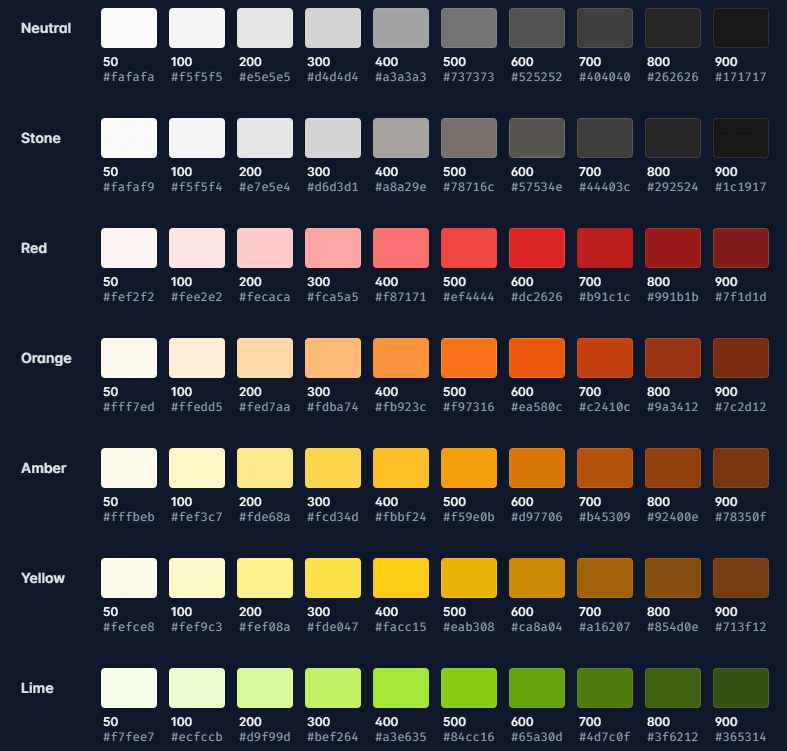
I used to spend an embarrassing amount of time on color decisions. Now I pick emerald-600 and move on with my life.
The parts that are genuinely annoying
The class names get long. Really long. A complex component can end up with a className prop that looks like someone fell asleep on their keyboard. Tailwind gives you @apply to extract repeated patterns into CSS classes, and you can create components to encapsulate things, but your markup gets noisier no matter what. If you like clean, minimal HTML, Tailwind will occasionally make you wince.
It also doesn't give you much out of the box in terms of pre-built components. Bootstrap hands you a fully styled navbar, modal, and dropdown system on day one. Tailwind hands you the building blocks and says "good luck." Full control, sure, but you're doing the work yourself.
And if you're joining a large existing codebase with a design system already in place, introducing Tailwind is going to be a rough conversation. Mixing two opinionated systems usually creates more problems than it solves.
Where I landed
I use Tailwind for basically everything now. This site is built with it. Most of my side projects start with it. When I'm prototyping something new and need to move fast, it's the first thing I reach for.
I don't think Tailwind is the "right" way to do CSS. I don't think there is one. It fits how I work: fast iteration, lots of experimentation, projects where I'm both the designer and the developer. If you're on a massive enterprise app with a dedicated design system team, your calculus is completely different, and that's fine.
The thing that surprised me most was how much of my resistance was based on principles I'd inherited rather than problems I'd actually experienced. "Separation of concerns" sounds important until you realize you've been maintaining two files in lockstep for years and calling it organized.
Sometimes the tool that feels wrong at first glance fits best once you actually use it. Tailwind was that for me.